
Introduction: Have You Ever Wondered How Google Finds Answers So Fast?
You type something into Google, maybe “how to make pizza” — and within less than one second, Google shows you thousands of results. It feels like magic, right?
But it is not magic. It is a very smart system called a search engine. And once you understand how it works, you will also understand why some websites show up on the first page of Google — and others do not.
In this guide, we will explain everything about search engine basics info in very simple and easy words. Whether you are a student, a blogger, a small business owner, or just a curious person — this guide is made for you. No complicated words. No confusing tech talk. Just clear, simple explanations.
By the end of this article, you will fully understand what a search engine is, how search engines work, and how you can use this knowledge to get your website found on Google.
What Is a Search Engine?
A search engine is a tool on the internet that helps you find information. You type a question or a word, and the search engine shows you a list of websites that have the answer.
Think of it like this:
Imagine you are in a huge library with millions and millions of books. You want to find a book about dinosaurs. Instead of walking through every shelf yourself, you ask the librarian. The librarian quickly goes and brings you a list of the best books about dinosaurs. That librarian is the search engine.
The most popular search engines in the world today are:
• Google (used by over 92% of people worldwide)
• Bing (made by Microsoft)
• Yahoo Search
• DuckDuckGo (a privacy-friendly option)
• Baidu (popular in China)
• Yandex (popular in Russia)
Important note: A search engine is NOT the same as a web browser. A browser (like Chrome, Firefox, or Safari) is the app you use to open websites. A search engine is a website inside that browser that helps you find other websites. For example, Chrome is a browser — Google is a search engine.
Why Are Search Engines Important?
Without search engines, finding information online would be extremely difficult. Imagine trying to locate one specific website among billions of pages on the internet.
Search engines help users:
- Find answers instantly
- Discover websites
- Shop online
- Watch videos
- Read news
- Learn new skills
- Research topics
They save time and make the internet easy to navigate.
How Do Search Engines Work? (Step-by-Step)
Now here comes the most interesting part — how search engines actually work behind the scenes. Understanding this is the heart of all search engine basics.
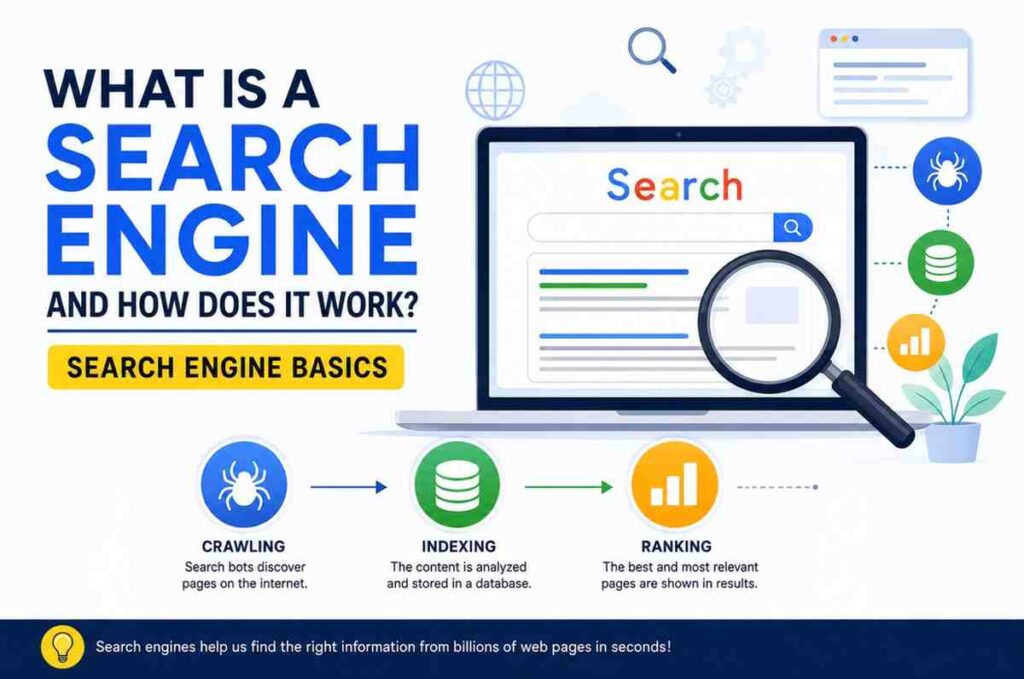
Search engines work in 3 big steps:
1. Crawling — Discovering websites
2. Indexing — Storing and organizing websites
3. Ranking — Showing the best results
Let’s look at each step one by one in very simple words.
Step 1: Web Crawling — How Search Engines Discover Websites
Imagine tiny robots that travel all over the internet, jumping from one website to another, reading everything they find. These robots are called web crawlers or spiders. Google’s crawler is called Googlebot.
These crawlers start from a list of known websites and then follow every link they find. If a website links to your page, the crawler will follow that link and discover your page too. This is called web crawling.
Here is exactly what crawlers look at when they visit a page:
• The text and headings on the page
• Links to other pages (both inside and outside the website)
• Images and videos
• How fast the page loads
• Whether the website works on mobile phones
• The robots.txt file (a file that tells crawlers which pages to visit or skip)
�� Key Point for Search Engine Basics: If no other website links to your page, Google’s crawlers may never find it. This is why getting backlinks (links from other sites) is so important in SEO.
Step 2: Search Engine Indexing — How Pages Get Stored
After a crawler visits your page, the next step is indexing. Indexing means saving the page’s information in a giant database.
Think of it like taking a photo of every page on the internet and storing it in a huge filing cabinet. Google’s index contains information on hundreds of billions of web pages stored in giant data centers around the world.
During indexing, Google tries to understand:
• What is this page about?
• What language is it written in?
• Is the content original, or copied from somewhere else?
• Is the information helpful and trustworthy?
• Which keywords and topics does this page cover?
Very important: Not every page gets indexed. Google may skip your page if:
• The content is too thin or low quality
• The page is blocked by a robots.txt file
• The page has a “noindex” tag
• The content is copied from another website
You can check if your pages are indexed by going to Google Search Console (it is free). Just type site:yourwebsite.com in Google to see which of your pages are in the index.
Step 3: Search Engine Ranking — How Google Decides Who Comes First
This is the most important step for anyone who wants to understand search engine basics. Ranking is the process where Google decides which pages to show first when someone searches for something.
Imagine 50 students all wrote an essay on the same topic. The teacher has to decide whose essay is the best and give them a rank (1st, 2nd, 3rd, and so on). Google does the same thing — but with billions of web pages.
Google uses a complex algorithm (a set of rules) with over 200 ranking factors to decide which pages deserve to be on the first page. The most important ones are:
| Ranking Factor | What It Means |
| Content Quality | Is the page genuinely helpful and well-written? |
| Keywords | Does the page include the words people are searching for? |
| Backlinks | Do other trusted websites link to this page? |
| Page Speed | Does the page load quickly on all devices? |
| Mobile-Friendly | Does the page work well on phones and tablets? |
| Search Intent | Does the page answer what the user actually wants? |
| E-E-A-T | Is the content written by an experienced, trustworthy expert? |
| HTTPS Security | Is the website secure (https://)? |
What Is SEO? (And How It Connects to Search Engine Basics)
Now that you understand how search engines work, let’s talk about SEO — which stands for Search Engine Optimization.
SEO is the practice of making your website better so that Google ranks it higher in search results. It is the bridge between your website and the search engine.
Think of it this way: if Google is the teacher who grades essays, then SEO is studying for the test. You learn what Google wants to see, and you make sure your website has all of those things.
SEO has three main parts:
1. On-Page SEO — Optimizing Your Content
This is everything you do inside your website and your articles to make them search-engine friendly:
• Use your main keyword naturally in the title, headings, and throughout the article
• Write a good meta description (the short summary that appears below your title in Google)
• Use headings properly (H1 for the main title, H2 for sections, H3 for sub-sections)
• Add internal links (links to other pages on your own website)
• Use images with descriptive alt text
• Write content that is detailed, helpful, and answers real questions
2. Off-Page SEO — Building Your Website’s Authority
This is everything you do outside your website to improve your ranking:
• Get backlinks from other reputable websites
• Get mentioned on social media platforms
• Guest post on popular blogs in your niche
• Get your site listed in online directories
Why do backlinks matter? When another trusted website links to yours, Google sees it as a vote of confidence. It’s like getting a recommendation from a respected person — it makes Google trust your site more.
3. Technical SEO — Making Your Website Easy for Google to Read
This is the behind-the-scenes work that makes sure Google can properly access and understand your website:
• Make sure your site loads fast (Google prefers fast websites)
• Make your website mobile-friendly (Google uses mobile-first indexing)
• Add HTTPS security (the small lock icon in the browser)
• Create and submit an XML sitemap to Google Search Console
• Fix broken links and 404 errors
• Use proper URL structure (short, clean, keyword-rich URLs)
Frequently Asked Questions About Search Engine Basics
What is the difference between a search engine and a browser?
A browser (like Chrome, Firefox, or Safari) is the software you use to open and view websites. A search engine (like Google or Bing) is a website inside that browser that helps you find other websites. You use the browser to visit the search engine.
How long does it take for Google to index a new website?
For a brand new website, it can take anywhere from a few days to several weeks for Google to crawl and index your pages. You can speed this up by submitting your sitemap in Google Search Console and getting at least one backlink from an already-indexed website.
Is SEO free?
Yes! The basics of SEO are completely free. You can use free tools like Google Search Console, Google Analytics, and Google Keyword Planner. The main investment is your time — writing quality content, building backlinks, and learning the skills.
How does Google make money if it is free to use?
Google makes most of its money through advertising. When you search for something, Google shows paid ads at the top and bottom of the results page. Businesses pay Google every time someone clicks on their ad. This is called Pay-Per-Click (PPC) advertising.
What is the #1 ranking factor on Google?
There is no single #1 factor — Google uses over 200 signals. However, most SEO experts agree that the three most powerful factors are: high-quality content that matches search intent, backlinks from trusted websites, and a great user experience (fast, mobile-friendly, easy to navigate).
Can I rank on Google without backlinks?
Yes, it is possible — especially for very specific, low-competition keywords. But for competitive keywords, backlinks are usually necessary. Building backlinks from trusted websites significantly speeds up your ability to rank higher.
What is the difference between organic results and paid results?
Organic results are the free listings ranked by Google’s algorithm based on quality and relevance. Paid results are advertisements — businesses pay Google to appear at the top. Organic results are marked with nothing, while paid results say “Sponsored” next to them.
Conclusion
Understanding search engine basics helps you learn how information is organized and found online. A search engine works through three main processes: crawling, indexing, and ranking. These processes allow users to find relevant information within seconds.
Whether you are a student, blogger, business owner, or digital marketer, knowing how search engines work is the first step toward understanding SEO and improving online visibility.
As the internet continues to grow, search engines will remain one of the most powerful tools for finding information quickly and efficiently.
Pingback: Keyword Research for Beginners