The Complete Guide to
Search Engine Basics
Everything you need to know about search engine basics and how search engines work — from crawling and indexing to ranking algorithms and SEO fundamentals — explained in a simple and easy-to-understand way.
Table of Contents:
- What is a search engine?
- How search engines work
- Crawling explained
- Indexing explained
- How ranking works
- Search algorithms
- How ranking works
- Search algorithms
- Types of search engines
- Google vs Bing vs others
- SEO basics
- History of search
- FAQ
- What to learn next
SECTION 1
Introduction: Why Search Engine Basics Matter in 206
Every day, over 8.5 billion searches are typed into Google alone. Whether someone is looking for the best smartphone, the nearest hospital, or how to bake bread — they turn to a search engine. Yet most people have no idea how these powerful systems actually work. Understanding search engine basics is no longer just for SEO experts or web developers. It matters to students, bloggers, business owners, marketers, journalists, and anyone who wants to navigate the digital world more effectively — or get their website found online. This guide covers everything: what search engines are, how they work, what algorithms decide rankings, how SEO connects to it all, and what the future of search looks like in the age of AI. We’ve analyzed every major competing resource and gone deeper, wider, and clearer than all of them.
What Is a Search Engine?
A search engine is a software system that indexes content from the internet and retrieves the most relevant results in response to a user’s query. When you type a phrase into Google, Bing, or DuckDuckGo, you’re interacting with a search engine. In simple wording: a search engine is a tool that finds information for you on the internet. It reads billions of web pages in advance, stores them in a giant database, and when you ask a question, it instantly retrieves the best answers. The results are displayed on what’s called a Search Engine Results Page (SERP) — the page you see after you hit Enter.
Search engines are the gateway to the internet. Without them, finding specific information online would be like trying to find a book in a library with no catalog system. Today, over 8.5 billion searches are performed on Google alone every single day — making search engines the most widely used tools on the internet.
8.5B
Google searches per day
92%
Global market share (Google)
<1s
200+
Global market share (Google)
Key takeaway: A search engine is not the same as a web browser. Your browser (Chrome, Firefox, Safari) is the software you use to access the internet. A search engine is a service — usually a website — that helps you find things on the internet.
How Do Search Engines Work? (Step-by-Step)
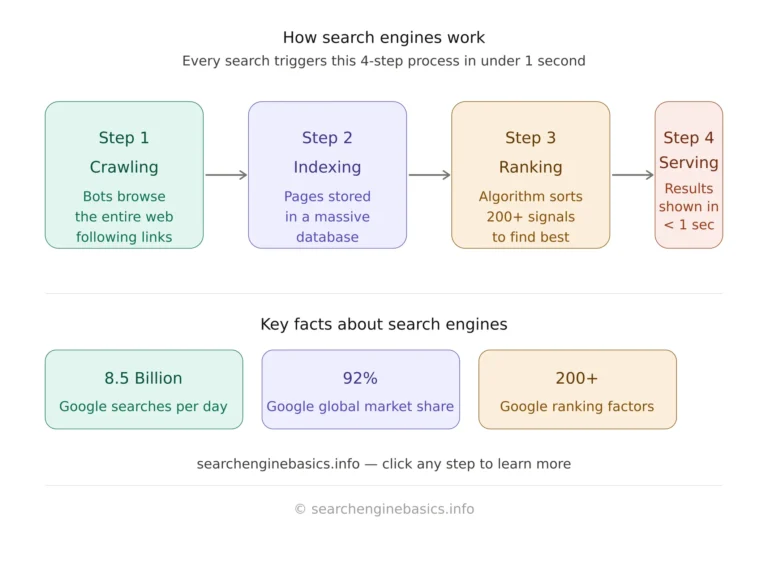
Search engines work through a three-stage process that happens continuously, 24 hours a day, 7 days a week — even when you’re not searching. Understanding this process is the foundation of all search engine knowledge.
1
Crawling: Automated bots discover pages by following links across the web continuously.
2
Indexing: Pages are analyzed, understood, and stored in a massive searchable database.
3
Ranking: When you search, an algorithm scores and sorts the most relevant indexed pages
4
Serving: The ranked results are displayed on the SERP in under one second.
Step 1 - What Is Web Crawling?
Crawling is the discovery process. Search engines use automated programs called web crawlers, spiders, or bots (Google’s is called Googlebot) to browse the internet and find new or updated web pages.
These crawlers start from a list of known URLs — called a seed list — and then follow every link they find on each page, jumping from one page to another. This is how new pages get discovered. If no website links to your page, a crawler may never find it.
Crawling — Discovering the Web
Crawling is the discovery phase. Search engines deploy automated programs called web crawlers, spiders, or bots to browse the internet and find web pages. Google’s crawler is called Googlebot. Bing uses Bingbot. These crawlers start from a list of known URLs — called a seed list — and then follow every link they encounter on each page. This is how new content gets discovered: by following the trail of hyperlinks across the web. If no other page links to your page, a crawler may never find it — which is why backlinks matter for discoverability.
What do crawlers look for on each page?
- Page title and meta description
- Heading tags (H1, H2, H3)
- Body text and keyword usage
- Internal and external links
- Image alt text
- Structured data and schema markup
- Page load speed and Core Web Vitals
- Mobile responsiveness
- Canonical tags and robots.txt instructions
What do crawlers look for?
When Googlebot visits a webpage, it analyzes the HTML code to understand the page’s content, structure, and user experience. Googlebot primarily focuses on key SEO elements such as high-quality text content, internal and external hyperlinks, optimized images with descriptive alt text, page titles, headings, meta descriptions, structured data markup, page loading speed, and mobile-friendliness. These factors help Google properly crawl, index, and rank webpages in search results for better visibility and organic traffic.
How often do crawlers visit?
The frequency at which Googlebot visits your site depends on how popular your site is and how often your content changes. A major news site might be crawled thousands of times per day. A small personal blog might be crawled once a week or less. You can control crawling behavior using a file called robots.txt.
Important: Not every page gets crawled. You can control crawling behavior using a robots.txt file (which tells crawlers what to access or ignore) and a sitemap.xml file (which lists your pages for easier discovery). |
Step 2 – What Is Search Engine Indexing?
Once a page has been crawled, the next step is indexing. Indexing is the process of storing and organizing the content found during crawling so it can be retrieved quickly when someone searches for it.
Google’s index contains information on hundreds of billions of web pages stored across data centers worldwide. Indexing is more than just saving a copy of the page. The search engine analyzes and processes:
- The topics and entities the page covers
- The language and geographic relevance
- The freshness and update frequency of content
- Whether the content is original or duplicated
• The page’s relationship to other indexed content
What happens during indexing?
When Google indexes a page, it processes the content to understand what the page is about, evaluates quality signals to check if the content is original and helpful, stores it in the index for fast retrieval, and decides on canonical URLs — if multiple pages have similar content, Google picks the “main” version to index.
Not all pages get indexed. Google may choose not to index a page if it is considered low quality, has thin or duplicate content, blocks crawlers, or has been manually penalized. You can check if your pages are indexed using Google Search Console.
Step 3 – How Does Search Engine Ranking Work?
Ranking is the most complex part of how search engines work. When you type a query, the search engine must instantly sort through potentially millions of indexed pages and decide which ones to show you — and in what order.
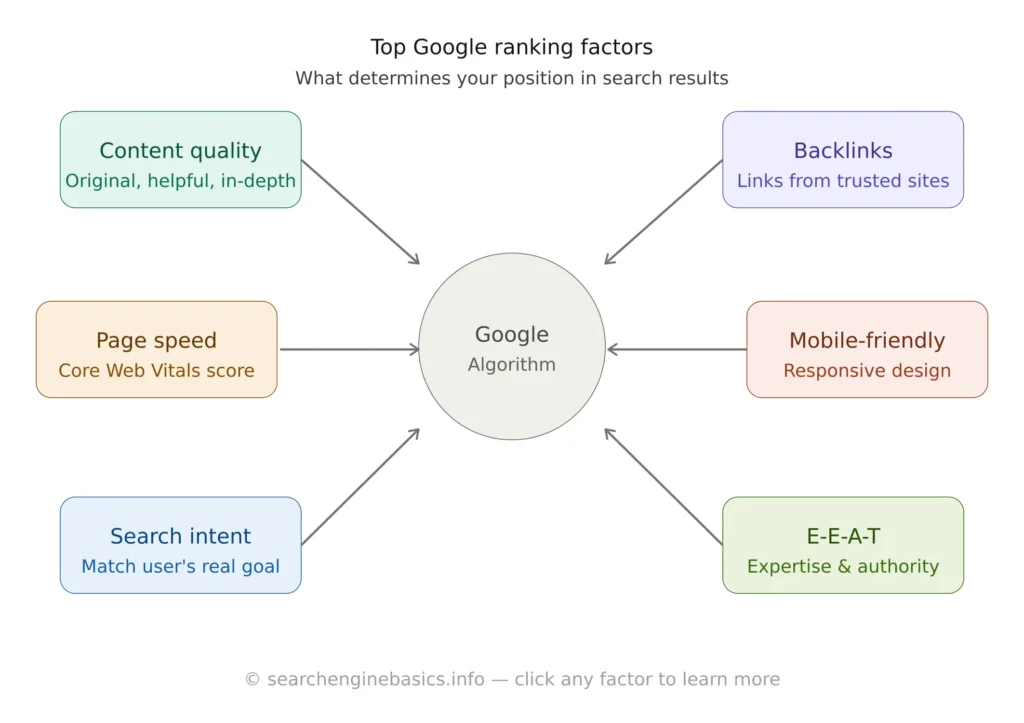
Google uses a sophisticated algorithm that evaluates over 200 ranking factors to determine the best results for any given search.
The top-ranking factors include:
- Content relevance and quality (does the page genuinely answer the query?)
- E-E-A-T: Experience, Expertise, Authoritativeness, Trustworthiness
- Backlink authority (how many reputable sites link to this page?)
- Page experience: Core Web Vitals (LCP, CLS, INP)
- Search intent match (informational, navigational, commercial, transactional)
- User behavior signals (CTR, dwell time, pogo-sticking)
- Mobile-friendliness and page speed
- HTTPS security
- Content freshness for time-sensitive topics
These factors fall into a few main categories:
Relevance
Does the page actually answer the search query? Search engines look at keyword matches, topic depth, headings, and semantic meaning — understanding what words mean in context, not just matching exact phrases.
Authority
Is this page from a trustworthy, credible source? Authority is largely determined by backlinks — other reputable websites linking to your page. The more high-quality sites that link to you, the more authoritative your page appears to Google.
User Experience
Google uses Core Web Vitals — real-world data on how fast, stable, and interactive a page is — as a ranking factor. A slow or poorly designed page will rank lower, even if the content is excellent.
Search Intent
Search intent is arguably the most important ranking factor today. Google tries to understand why someone is searching, not just what they typed. There are four types of search intent:
Intent type | What the user wants | Example query |
Informational | Learn something | “how does a search engine work” |
Navigational | Go to a specific site | “Google Search Console login” |
Commercial | Research before buying | “best SEO tools 2026” |
Transactional | Complete an action or purchase | “buy SEO course online” |
The key insight: Google’s algorithm has shifted from simply matching keywords to truly understanding language and intent. Writing naturally for humans — not stuffing keywords — is now the most effective SEO strategy.
Step 4: Serving — Displaying Results on the SERP
The final step is serving results to the user on the Search Engine Results Page (SERP). Modern SERPs are complex and include much more than just ten blue links:
- Organic results (ranked by algorithm, unpaid)
- Paid ads (Google Ads, displayed at top and bottom)
- Featured snippets (Position Zero — direct answers)
- People Also Ask (PAA) boxes
- Knowledge panels (entity information from Google’s Knowledge Graph)
- Local pack / Google Maps results
- Image carousels
- Video results
- Shopping results
- AI Overviews (Google’s generative AI summaries, 2024+)
Search Engine Algorithms: The Brain Behind Rankings
A search algorithm is the mathematical formula and set of rules a search engine uses to rank web pages. Google’s algorithm has evolved dramatically over its history. Here are the key algorithm updates every beginner should know:
Algorithm | Year | What It Changed |
PageRank | 1998 | Ranked pages by the number and quality of backlinks — the original Google algorithm |
Florida | 2003 | First major spam-fighting update; penalized keyword stuffing |
Panda | 2011 | Penalized thin, low-quality, and duplicate content; rewarded depth |
Penguin | 2012 | Penalized manipulative link schemes and unnatural backlink profiles |
Hummingbird | 2013 | Introduced semantic search — understanding meaning, not just keyword matching |
Pigeon | 2014 | Improved local search results and Google Maps integration |
Mobilegeddon | 2015 | Made mobile-friendliness a direct ranking factor |
RankBrain | 2015 | First AI/ML ranking signal; helps interpret ambiguous or new queries |
Medic | 2018 | Heavily impacted health/medical/financial sites; boosted E-A-T importance |
BERT | 2019 | Deep language understanding via NLP; better at interpreting prepositions and context |
Core Web Vitals | 2021 | Made page experience signals (LCP, CLS, FID) official ranking factors |
Helpful Content | 2022 | Penalized AI-generated and unhelpful content; rewarded people-first writing |
MUM / Gemini | 2021-25 | Multimodal AI understanding text, images, video; powers AI Overviews |
The most important takeaway from algorithm history: Google has consistently moved toward rewarding genuinely helpful, human-written content and away from technical tricks. Writing for people — not search engines — has always been the right long-term strategy. |
Types of Search Engines
Not all search engines work the same way. There are several different types, each built for different purposes:
Crawler-based search engines
The most common type — they use automated crawlers to build their index. Examples: Google, Bing, Baidu, Yandex. They are the most comprehensive because they continuously scan the entire web.
Human-edited directories
Popular in the early internet era (e.g. Yahoo Directory, DMOZ). Real humans reviewed and categorized websites. They are largely obsolete today because the web grew too large to manage manually.
Meta search engines
These don’t build their own index. Instead, they send your query to multiple search engines simultaneously and combine the results. Examples: Dogpile, MetaCrawler.
Specialty / vertical search engines
These focus on a specific type of content: Google Images (photos), Google Scholar (academic papers), YouTube (video), Amazon (products), Zillow (real estate).
Privacy-focused search engines
These prioritize user privacy by not tracking your searches or building a personal profile. Examples: DuckDuckGo, Brave Search, Startpage.
Google vs Bing vs DuckDuckGo: How They Compare
While Google dominates with over 92% global market share, other search engines serve important niches. Here is how the major players compare:
Feature | Bing | DuckDuckGo | |
Market share | ~92% | ~3% | ~0.6% |
Tracks users | Yes | Yes | No |
AI integration | Gemini AI | Copilot (GPT-4) | DuckAssist |
Best for | General search | Images, rewards program | Private browsing |
Index source | Own crawler | Own crawler | Bing + own sources |
For most users, Google provides the most relevant results due to its larger index and more sophisticated algorithm. However, DuckDuckGo is growing rapidly among privacy-conscious users, and Bing has gained attention for its deep integration with Microsoft’s AI Copilot.
SEO Basics: How to Get Found on Search Engines
SEO (Search Engine Optimization) is the practice of improving your website so that it appears higher in search engine results. Understanding how search engines work is the foundation of all SEO — if you know how pages get crawled, indexed, and ranked, you know exactly what to optimize.
On-page SEO
Optimizing the content and HTML of individual pages:
- Title tag: Include your target keyword naturally within 60 characters
- Meta description: Compelling 155-character summary that improves click-through rate
- H1 heading: One per page, clearly stating the page’s main topic
- H2/H3 headings: Structured subheadings using related keywords and LSI terms
- Keyword placement: Target keyword in first 100 words, used naturally throughout
- Content depth: Cover the topic more thoroughly than competitors
- Internal linking: Link to related pages on your site to build topical authority
- Image optimization: Descriptive alt text, compressed file sizes
- URL structure: Short, keyword-rich, hyphen-separated URLs
- Schema markup: Structured data to enhance SERP appearance with rich results
Off-page SEO
Actions taken outside your website that influence rankings:
- Backlink building: Earning links from authoritative, relevant websites
- Digital PR: Getting mentioned in news articles and industry publications
- Social signals: Brand mentions and shares (indirect ranking influence)
- Guest posting: Publishing articles on high-authority sites in your niche
- Local citations: Consistent NAP (Name, Address, Phone) across directories
- Google Business Profile optimization for local search visibility
Technical SEO
Ensuring search engines can properly access, crawl, and index your site:
- Site speed: Optimize Core Web Vitals — LCP, CLS, INP
- Mobile-first design: Google indexes mobile version of your site first
- HTTPS: SSL certificate is a confirmed ranking signal
- XML sitemap: Submit to Google Search Console for faster indexing
- Robots.txt: Control which pages crawlers can and cannot access
- Canonical tags: Prevent duplicate content issues
- Structured data / JSON-LD: Help Google understand page content
- Fixing crawl errors: Monitor and fix 404s, redirect chains, and broken links
• Log file analysis: Understand exactly how Googlebot crawls your site
Note: The golden rule of SEO: Create genuinely helpful, original content that answers real questions from real people. Google’s algorithm is increasingly sophisticated at identifying and rewarding content that truly serves users — and penalizing content created purely to manipulate rankings.
E-E-A-T: Google’s Quality Framework
E-E-A-T stands for Experience, Expertise, Authoritativeness, and Trustworthiness. It is the framework Google’s human quality raters use to evaluate content quality, and it heavily influences how the algorithm scores pages — especially in YMYL (Your Money or Your Life) categories like health, finance, and legal. The extra ‘E’ for Experience was added in 2022, emphasizing that Google values content written by people with first-hand, real-world experience of the topic.
Signal | What It Means | How to Demonstrate It |
Experience | Author has direct, personal experience with the topic | First-person accounts, original data, case studies, author bio |
Expertise | Author has formal or demonstrated knowledge | Credentials, detailed accuracy, comprehensive coverage |
Authoritativeness | The site/author is recognized as a go-to source | Backlinks from reputable sites, brand mentions, citations |
Trustworthiness | The site is accurate, safe, and transparent | HTTPS, clear authorship, citations, privacy policy, contact info |
A Brief History of Search Engines
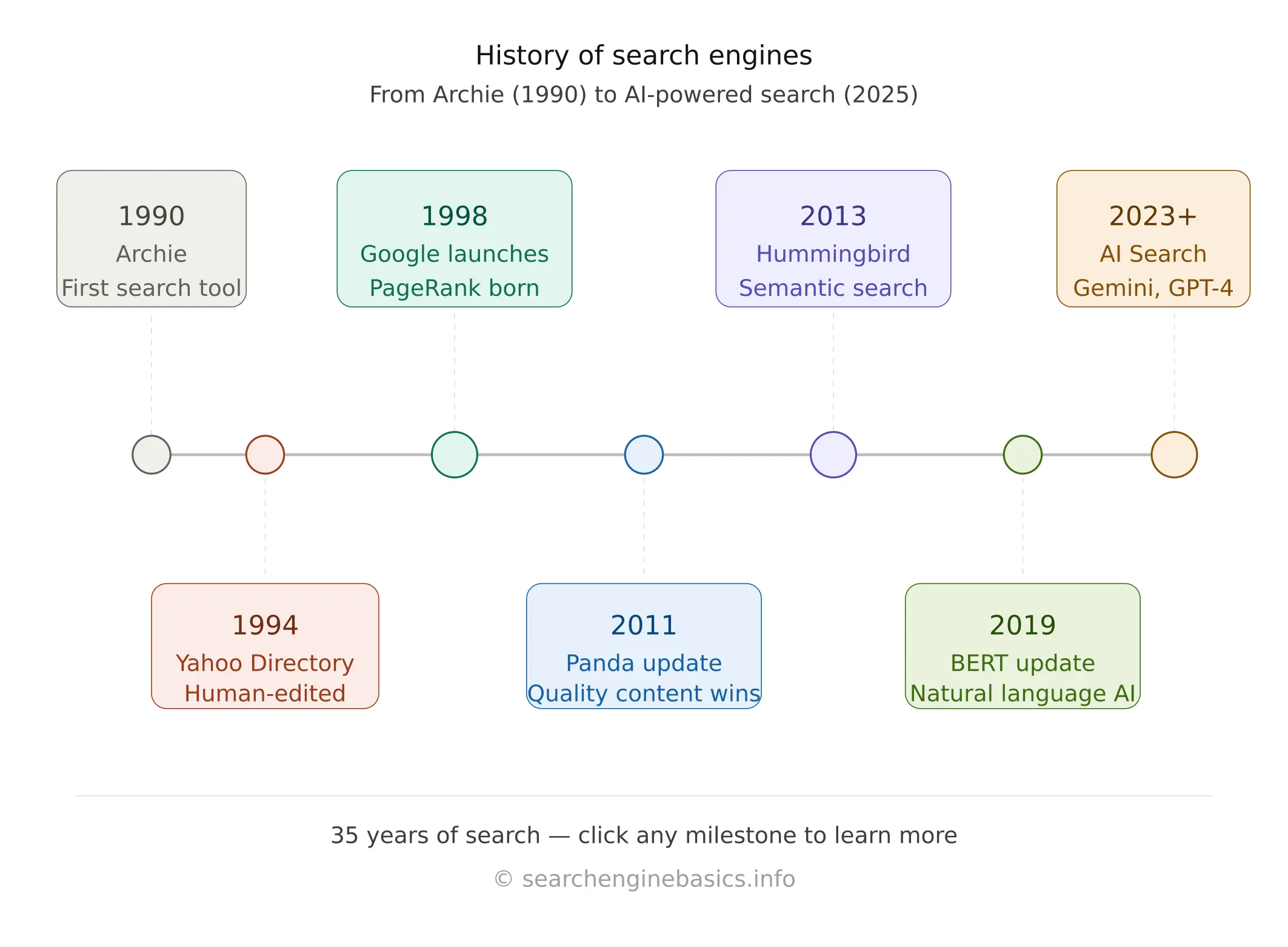
Search engines have transformed dramatically since the early days of the internet. Here is a quick timeline of how we got where we are today:
Year | Milestone |
1990 | Archie — the first search tool, indexed FTP file names |
1993 | Excite and AltaVista launch — early full-text search engines |
1994 | Yahoo Directory launched as a human-curated web index |
1996 | Larry Page and Sergey Brin develop BackRub (later renamed Google) |
1998 | Google officially launches with the PageRank algorithm |
2000 | Google AdWords launches — search advertising is born |
2009 | Microsoft launches Bing, replacing Live Search |
2013 | Google Hummingbird introduces semantic and conversational search |
2015 | RankBrain — Google’s first AI and machine learning ranking signal |
2019 | BERT makes Google dramatically better at understanding language |
2023–25 | AI-powered search (SGE, Copilot, Perplexity) reshapes the landscape |
Frequently Asked Questions About Search Engines
These questions are phrased exactly as people search them — giving this page a strong chance of appearing in Google’s featured snippets.
What is the difference between a search engine and a browser?
A browser (like Chrome, Firefox, or Safari) is software installed on your device that lets you access and view websites. A search engine (like Google or Bing) is a website or service that helps you find specific pages on the internet. You use a browser to visit a search engine.
How does Google decide which website ranks first?
Google uses an algorithm with over 200 ranking signals. The most important factors include the relevance of the content to the search query, the quality and quantity of backlinks pointing to the page, page experience signals (speed, mobile-friendliness), and how well the page matches the user’s search intent.
How long does it take for Google to index a new website?
For a brand new website, it typically takes anywhere from a few days to several weeks for Google to crawl and index your pages. You can speed up this process by submitting your sitemap in Google Search Console and getting at least one backlink from an already-indexed website.
What does it mean when a page is "not indexed"?
If a page is not indexed, it means Google has either not discovered it yet, or has chosen not to include it in its database. Pages may not be indexed if they have thin or duplicate content, are blocked by a robots.txt file or noindex tag, or have serious technical issues preventing crawling.
Is SEO still relevant in the age of AI search?
Yes — arguably more than ever. AI search tools like Google’s AI Overviews pull information from indexed web pages. Creating high-quality, well-structured, authoritative content remains the foundation of being cited by both traditional and AI-powered search results. The tactics change, but the principle of creating genuinely helpful content does not.
What is a search engine results page (SERP)?
A SERP (Search Engine Results Page) is the page displayed by a search engine after you enter a query. It typically contains organic results (unpaid, ranked by algorithm), paid ads, and special features like featured snippets, image carousels, local packs, People Also Ask boxes, and knowledge panels.
Conclusion: Your Next Steps
You now have a comprehensive understanding of search engine basics — from how crawlers discover your site, to how algorithms rank pages, to what the future of AI-powered search looks like.
The internet is built on search. Whether you want to be found by customers, understood by Google, or simply navigate the web more intelligently — this knowledge is your foundation.
Recommended next topics to explore:
- Keyword research: How to find what your audience is searching for
- On-page SEO: Optimizing titles, headings, and content structure
- Backlink building: Earning authority through links from other sites
- Technical SEO: Site speed, mobile optimization, and Core Web Vitals
- Local SEO: Getting found in Google Maps and local search results
- Content strategy: Building a topical authority hub around your niche
Found this guide helpful? Bookmark searchenginebasics.info and check back regularly — we update our guides as search engines evolve. New content added every week. |