
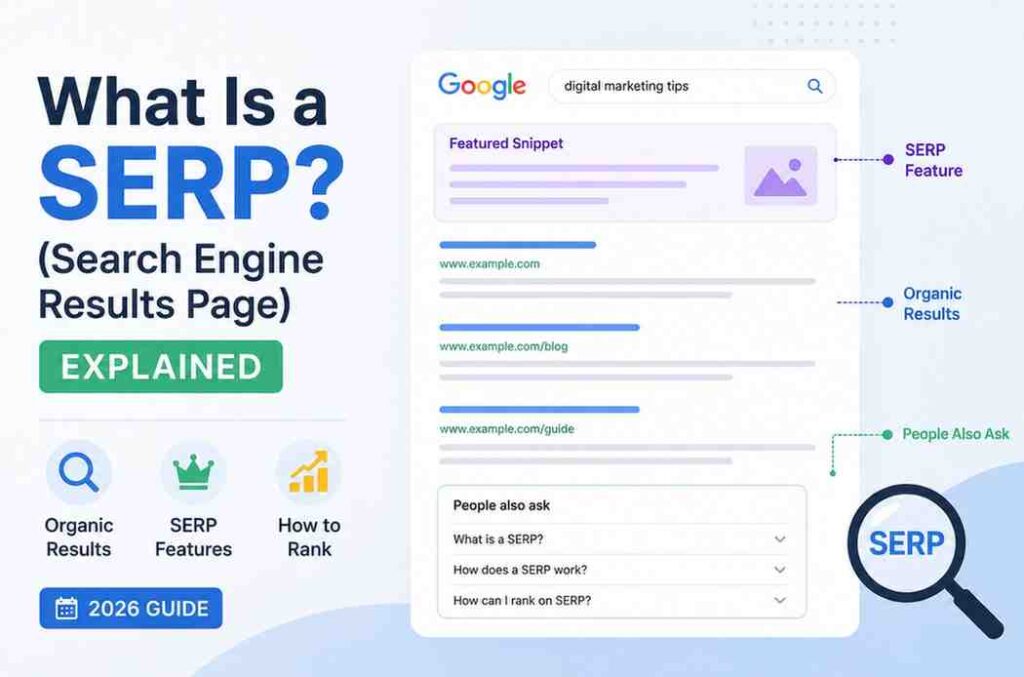
Have you ever typed something into Google and wondered, what exactly is this page I’m looking at? Why do some results have star ratings? Why does Google sometimes answer your question right at the top before you even click anything?
That page you’re looking at has a name. It’s called the SERP — the Search Engine Results Page.
Understanding what a SERP is, and how it works, is one of the most important parts of search engine basics. Whether you’re a blogger, a student, a business owner, or just someone who uses Google every day — knowing how the SERP works helps you understand why some websites appear on page 1 and others don’t.
In this complete beginner’s guide, we’ll explain everything about SERPs in simple, easy words. No confusing jargon. Just clear explanations that actually make sense.
What Is a SERP?
SERP stands for Search Engine Results Page.
Simply put, a SERP is the page that appears after you type something into a search engine like Google, Bing, or Yahoo and press Enter. It is the page that shows you a list of results related to what you searched for.
Every time you search something online, you are looking at a SERP.
Think of it like this:
Imagine walking into a huge library and asking the librarian for books about “how search engines work.” The librarian goes away and comes back with a list of the 10 best books on that topic, ranked from most helpful to least helpful. That list the librarian hands you — that is the SERP.
As we explain in our search engine basics guide, a search engine works by crawling the web, indexing content, and then ranking pages. The SERP is where all of that hard work becomes visible to the user. It is the final output — the results page the user actually sees.
Why Does the SERP Matter?
The SERP is the most important page on the internet for anyone who wants to grow a website.
Here’s why:
It decides your website’s traffic. If your page appears on the first SERP (page 1 of Google), you get visitors. If you appear on page 2 or beyond, almost nobody will find you. Research shows that the first result on Google gets about 27% of all clicks — and results below position 5 get very little traffic at all.
It determines trust. Users trust Google’s top results. If your page is near the top of the SERP, users automatically assume you are a reliable source.
It is where SEO success is measured. Everything you do in SEO — writing great content, building backlinks, doing keyword research — has one goal: to move your page higher on the SERP.
The Two Main Types of SERP Results
Not all results on a SERP are the same. There are two main types: organic results and paid results.
1. Organic Results
Organic results are the free listings that appear on the SERP because Google’s algorithm decided they are the best answer to the search query. You cannot pay Google to appear here — you earn this position by having great, relevant, and trustworthy content.
Organic results are ranked by Google’s algorithm, which uses over 200 signals to decide the order. We cover these ranking signals in detail in our guide on what is a search engine and how it works.
Key facts about organic results:
- They are free — you don’t pay per click
- They are ranked purely on quality and relevance
- They appear below any paid ads on the page
- They are marked with nothing (no label)
- Long-term SEO focuses on getting organic rankings
2. Paid Results (Google Ads)
Paid results are advertisements. Businesses pay Google a fee every time someone clicks on their ad. This system is called Pay-Per-Click (PPC) advertising, and it uses Google Ads.
Key facts about paid results:
- They appear at the very top and bottom of the SERP
- They are labeled with a small “Sponsored” tag
- Businesses bid on keywords to show their ad
- They disappear the moment you stop paying
- They look similar to organic results but are clearly marked
Which is better — organic or paid?
Both have their place. Paid ads give you instant visibility. Organic rankings take time but are free and last longer. For a content blog like yours, organic is the main goal.
SERP Features — All the Different Types Explained
Here is where things get interesting. Modern SERPs are not just a simple list of 10 blue links anymore. Google now shows many different types of results, called SERP features. Each one looks different and serves a different purpose.
Let’s go through every major SERP feature:
1. Featured Snippet (Position Zero)
A featured snippet is a special box that appears at the very top of the SERP — even above the first organic result. Google pulls a short answer directly from a web page and shows it to the user without them needing to click.
It answers the user’s question immediately inside the SERP itself.
Types of featured snippets:
- Paragraph snippets — a text answer (most common)
- List snippets — numbered or bullet-point lists
- Table snippets — data shown in a table format
Featured snippets are sometimes called Position Zero because they appear above the #1 organic result. They are extremely valuable for traffic and brand visibility.
How to get a featured snippet: Write clear, direct answers to specific questions. Use question-based headings (like “What is a SERP?”) and answer concisely in the first 2–3 sentences below that heading.
2. People Also Ask (PAA)
People Also Ask is a box of related questions that users commonly search for. Each question can be expanded to show a short answer pulled from a web page.
Example: If you search “what is a SERP,” Google might show PAA questions like:
- What does SERP stand for?
- What is a SERP feature?
- Why is the SERP important for SEO?
PAA boxes are great opportunities. If your page answers these questions clearly, Google can include you in the PAA box, giving you extra visibility without even ranking #1.
As we explain in our keyword research guide, PAA questions are also a goldmine for finding new keyword ideas for your content strategy.
3. Knowledge Panel
A Knowledge Panel appears on the right side of the SERP (on desktop) and shows structured information about a person, company, place, or concept. Google pulls this data from its Knowledge Graph — a database of real-world entities.
Example: Search for a famous company, and you’ll see a box on the right with their logo, description, website, social media links, and more.
Getting a Knowledge Panel for your brand is a long-term goal that comes with building strong online authority and having consistent information across the web.
4. Local Pack (Map Pack)
When someone searches for a local business — like “coffee shop near me” or “dentist in Lahore” — Google often shows a map with three nearby business listings below it. This is called the Local Pack or Map Pack.
Each listing shows:
- Business name and category
- Star rating and number of reviews
- Address and distance
- Opening hours
- Link to Google Maps
The Local Pack is extremely powerful for brick-and-mortar businesses. Ranking in it requires a well-optimized Google Business Profile and local SEO.
5. Image Carousel
For visual searches — like “types of logos” or “red dress outfits” — Google shows a horizontal row of images at the top or middle of the SERP. Clicking an image opens Google Images.
To appear in image carousels, use descriptive file names and alt text for your images, as we mention in our guide on search engine basics.
6. Video Results
For how-to queries, tutorials, or entertainment searches, Google often shows YouTube video thumbnails directly in the SERP. These appear with a play button, title, channel name, and duration.
Example: Search “how to tie a tie” and you’ll likely see video results near the top.
7. Shopping Results
When someone searches for a product to buy, Google shows a row of product listings with images, prices, and store names at the top of the SERP. These are called Google Shopping results and are paid placements set up through Google Merchant Center.
8. News / Top Stories
For trending topics, recent events, or anything time-sensitive, Google shows a “Top Stories” carousel with recent news articles, their publication names, and timestamps.
9. Site Links
Sitelinks are extra links that appear below a website’s main result in the SERP. They show the main inner pages of a website, making it easier for users to navigate directly to what they need.
Example: When you search for “searchenginebasics.info,” Google might show sitelinks to the Blogs page, About page, and specific articles.
Sitelinks are awarded automatically by Google to trusted, well-structured websites. They are a sign that Google trusts your site’s internal structure.
10. AI Overview (Formerly SGE)
Since 2024, Google has been showing AI-generated summaries at the very top of the SERP for many queries. These are called AI Overviews and are powered by Google’s Gemini AI model.
AI Overviews pull information from multiple web pages and summarize the answer in a few sentences, with links to the sources used. This is a major shift in how SERPs look and is directly related to GEO (Generative Engine Optimization) — something we will be covering in depth soon on searchenginebasics.info
What Is Position Zero?
You’ve probably heard SEO experts talk about wanting to rank “number one on Google.” But did you know there’s actually a position above number one?
Position Zero refers to the featured snippet — the answer box that appears above all organic results. It is called Position Zero because it sits outside the traditional numbered list of results.
Why does Position Zero matter?
- It gets massive visibility — it’s literally the first thing users see
- Users often read the answer directly without clicking — so your brand name appears even if they don’t visit your site
- It builds trust and authority in your niche
- For voice search (like Google Assistant or Siri), the Position Zero answer is usually what gets read aloud
How to target Position Zero:
- Find question-based keywords (who, what, how, why, when)
- Write a clear, direct answer in the first 40–50 words after a question heading
- Use lists and tables where relevant
- Make sure your page already ranks in the top 10 — Google usually pulls featured snippets from pages already ranking well
Frequently Asked Questions About SERPs
What does SERP stand for?
SERP stands for Search Engine Results Page — the page you see after you type something into a search engine and press Enter.
How many results are on a SERP?
Traditionally, Google shows 10 organic results per page. However, modern SERPs also include various SERP features (featured snippets, People Also Ask, videos, etc.) which can push organic results further down the page.
What is the difference between a SERP and a search engine?
A search engine (like Google) is the entire system that crawls, indexes, and ranks web pages. The SERP is the results page that the search engine shows you. Think of it this way: Google is the librarian, and the SERP is the list of books the librarian hands you.
Why does the SERP look different for different searches?
Because of search intent. Google shows different types of results depending on what users want. A shopping query shows product listings; a how-to query shows videos and guides; a local query shows a map. Google’s goal is always to give the user exactly what they’re looking for.
Is it possible to appear on the SERP without ranking #1?
Yes! SERP features like featured snippets, People Also Ask, image results, and video carousels can give your content visibility even if you’re not in the #1 organic position. This is why optimizing for SERP features is a key part of modern SEO.
What is a rich result or rich snippet?
A rich result (also called a rich snippet) is an enhanced SERP listing that includes extra visual elements like star ratings, prices, FAQs, or images. These are generated using structured data (Schema markup) added to your page’s HTML.
How long does it take to appear on the SERP?
For a new website, it typically takes a few weeks to a few months before pages start appearing in SERP results. You can speed this up by submitting your sitemap to Google Search Console, getting backlinks, and producing high-quality content regularly. We cover this in detail in our guide on search engine basics.
Does being on the SERP guarantee clicks?
Not always. Even if you appear on the SERP, you need a compelling title and meta description to get users to actually click. Also, some SERP features (like featured snippets) answer the question directly, meaning users may not click through even if your site is shown.
Conclusion: The SERP Is Where Everything Comes Together
The Search Engine Results Page is the final destination of everything a search engine does. When Google crawls a page, indexes it, and decides to rank it — the SERP is where that decision becomes visible to the world.
Pingback: What Is Googlebot and How Does It Crawl Websites?